
MacMister PST Converter for Mac: Remarkable Email Migration Solution for Mac Users
Everything about the corporate sector revolves around data, and the standard method of archiving all communication data on Windows platforms is Microsoft Outlook's PST file. But things get tough when there is a transition from Windows to Apple in terms of hardware, and then all the historical PST data becomes an obstacle to be crossed.
This is because in the case of Mac operating systems, files work on completely different architectures such as OLM or MBOX, and opening up a Windows PST file without an exchange account or an outdated version of the Outlook for Mac application is impossible.
MacMister PST Converter for Mac comes as a solution to this problem by offering an efficient tool capable of easily extracting and converting all data in Windows PST databases to Mac-compliant format.
Migration across Different Platforms
PST files are sophisticated and highly delicate database structures. In addition to the plain text format, they store structured information, metadata, embedded pictures, calendar meetings, and large attachments.
During migration processes carried out by using manual solutions or web-based converters, many people usually experience difficulties such as:
- Broken Folder Structure: Deeply layered sub-folders become totally flattened, resulting in a jumbled mess of unclassified emails.
- Metadata Corruption: Key information contained in email headers such as “BCC,” “Sent Date,” or status indicators may be lost.
- File Size Limitations: Free software is known to consistently fail when trying to manage files over 10GB or even 20GB.
MacMister PST Converter for Mac is precisely developed to overcome such shortcomings, with the provision of an automated and native tool designed explicitly for the macOS platform.
Noteworthy Features of MacMister PST Converter for Mac
MacMister stands out from the rest due to the forensic accuracy of the software coupled with a highly user-friendly interface.
1. Equipped with Different Saving Options
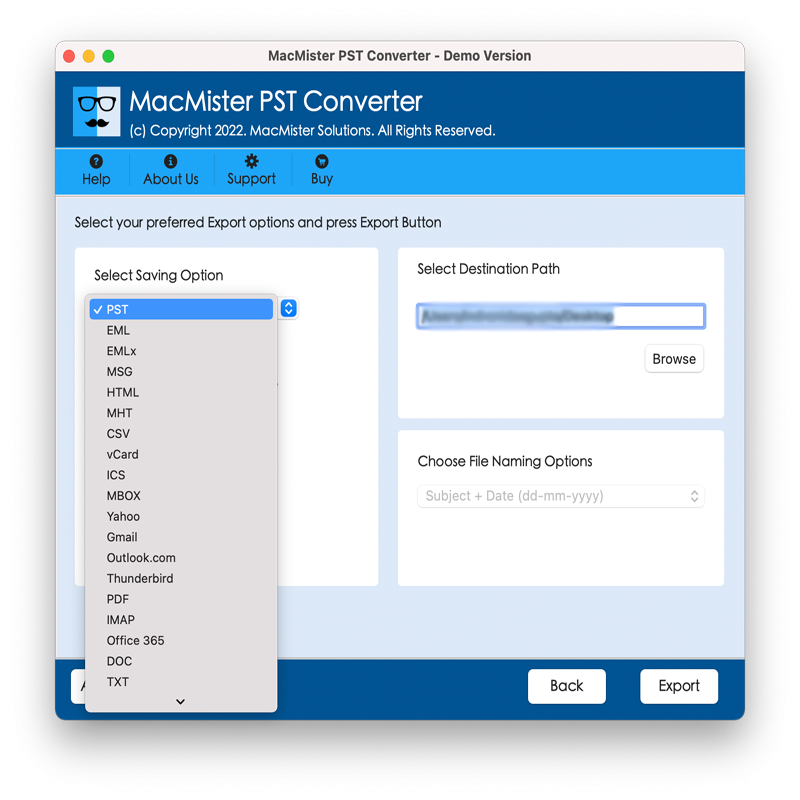
Instead of converting the PST files only to a standardized format, the tool works as an universal converter. It allows for conversion of PST databases into more than 15 formats and cloud platforms, which include:
· File Formats: OLM (Mac Outlook), MBOX (Apple Mail, Thunderbird), EML, EMLX, PDF, MSG, HTML, and CSV (Contacts).
· Cloud Platforms: Conversion and exporting of PST database into cloud platforms such as Office 365, Gmail, Google Suite, Yahoo Mail, IMAP Servers, and iCloud.
2. Preserves Email Properties during Conversion
Maintaining data integrity is the primary focus of MacMister. In the course of converting the files, MacMister ensures through the use of state-of-the-art algorithms that the underlying structure of your mailbox is an exact match to the original. The following elements are all preserved exactly in their original form:
· Folder Hierarchy (Inbox, Sent, Custom Subfolders).
· Rich Text Formatting (HTML formatting, color, graphics).
· Meta Headers (To, From, Cc, Bcc, Subject, Date/Time stamps).
· Attachments contained within each email message.
3. Offer Dual Modes to Upload PST Files
It makes no difference if you have a single PST file to convert, or even hundreds of PST files for your whole team, as MacMister will convert them all without problems. MacMister has Add Files and Add Folders buttons to quickly convert as many PSTs as possible at one time.
4. Effective Data Filtering
It is not mandatory for you to transfer all ten years worth of email messages. MacMister offers smart filter settings which enable you to organize and transform information depending on certain filters. It is possible to segregate files based on Date Range, Sender, Receiver, or Specific Subject Lines.
How It Works: Simple 3 Step Process
MacMister does away with the need for complicated command codes or configurations associated with technological applications. The Graphic User Interface (GUI) is designed to be user-friendly even for non-tech savvy individuals.
Step 1. Launch the software on your Mac system, and then click Add Files/Folders, choosing the Windows PST files to convert into another format.
Step 2. Pick the destination format, such as MBOX or Outlook Mac, and choose the location where you will save the new database file.
Step 3. Click the Export button. The software provides a real-time progress report as it cleanly processes your database.
Why Choose MacMister Over other Solutions?
While a lot of legacy migration software options are just low-performing Windows programs that were made for macOS but are not optimized properly, MacMister was created from scratch specifically to operate within the confines of the latter operating system. It can run flawlessly on all versions of the OS without the need to install any other software such as Rosetta.
MacMister does not depend on Microsoft Outlook being installed on your computer. It can access and process "orphaned" PST files in an offline mode, ensuring the security of your sensitive corporate data.
Conclusion
Transferring historic data from one operating system to another should not be like walking a tightrope. For those who seek a safe, super-fast, and entirely secure approach to access the data in Microsoft Outlook in Windows through Apple devices, there is MacMister PST Converter for Mac.
There is even a trial version of this software which converts the first 25 items in every folder at no cost.

 Arabic
 French
 Spanish
 Portuguese
 Deutsch
 Turkish
 Dutch
Dutch
 Italiano
 Russian
 Romaian
 Portuguese (Brazil)
 Greek
Greek